Automate Your QuickBooks® Workflow with AI
Eliminate manual data entry. Automatically extract invoice data and sync directly into QuickBooks®.
ลดงานคีย์ข้อมูลด้วยมือ ระบบ AI อ่านเอกสารและส่งข้อมูลเข้า QuickBooks® ให้อัตโนมัติ
From Invoice to QuickBooks® — Fully Automated
จากเอกสารถึง QuickBooks® — อัตโนมัติทั้งหมด
See the AI In Action
ดูระบบ AI ทำงานจริง — จากเอกสารถึง QuickBooks® ใน 4 ขั้นตอน
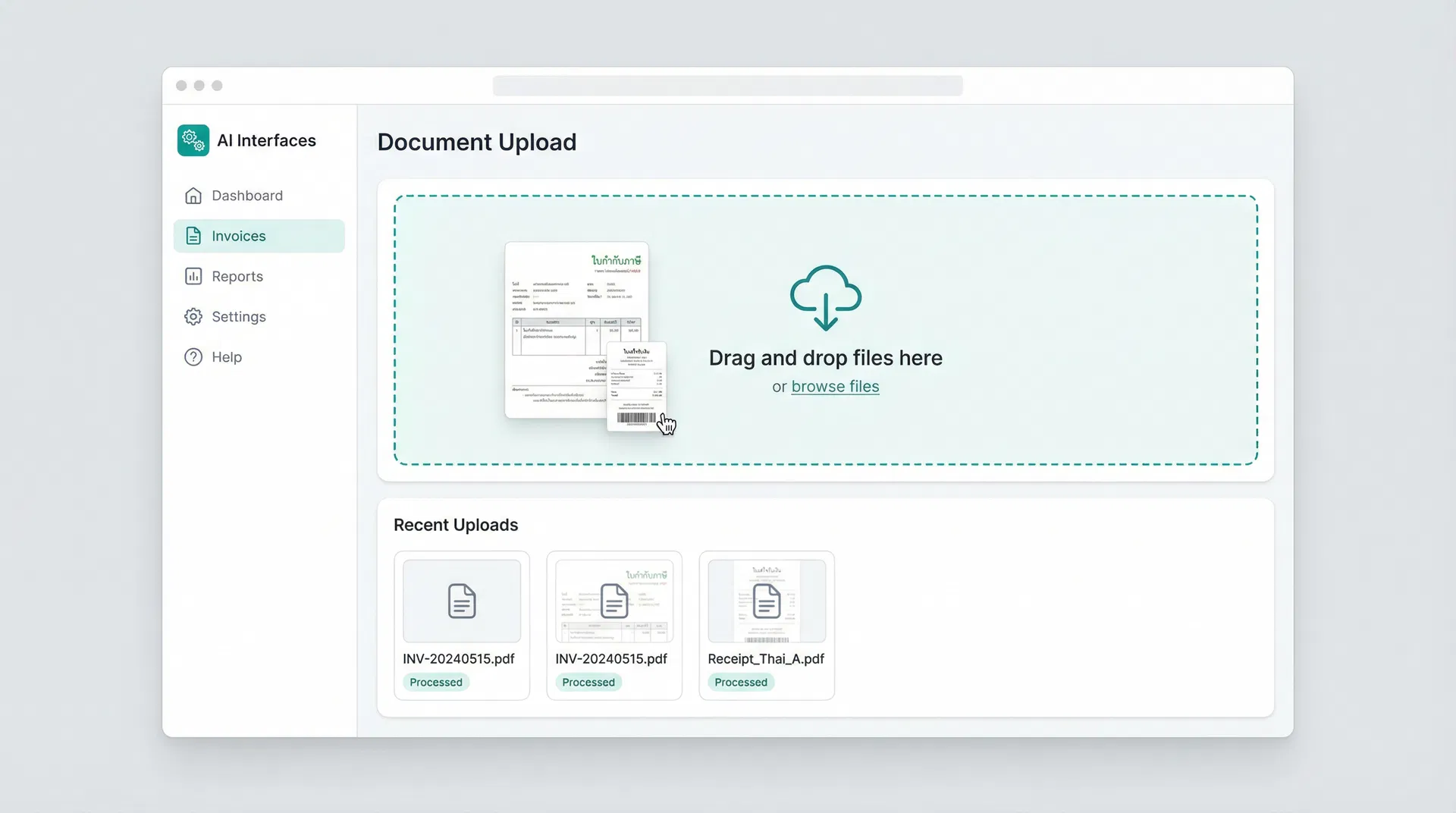
Upload Invoice
อัปโหลดเอกสาร
Drag & drop PDF invoices or forward via email
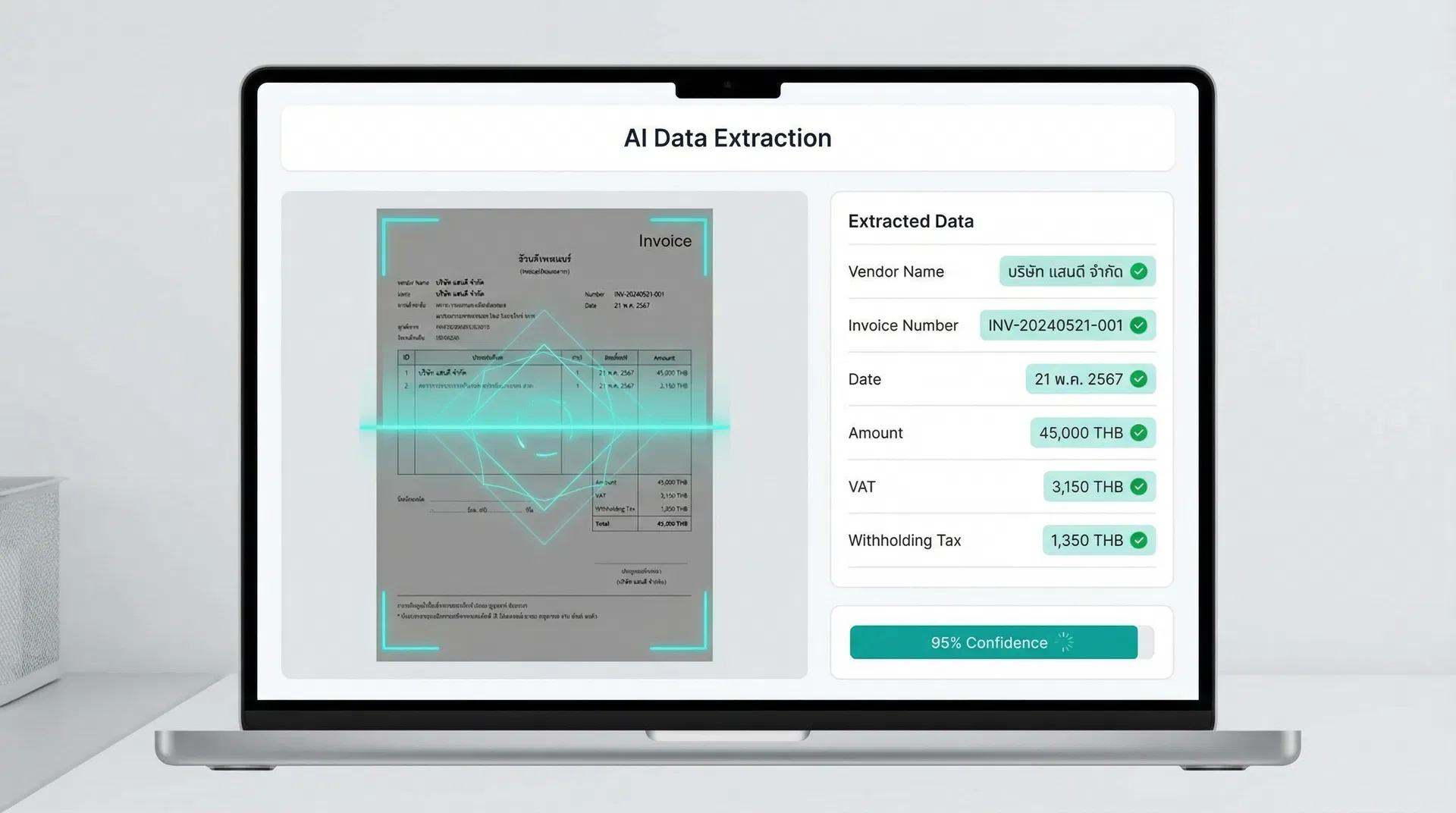
AI Extracts Data
AI ดึงข้อมูล
Vendor, amount, VAT, date — extracted automatically
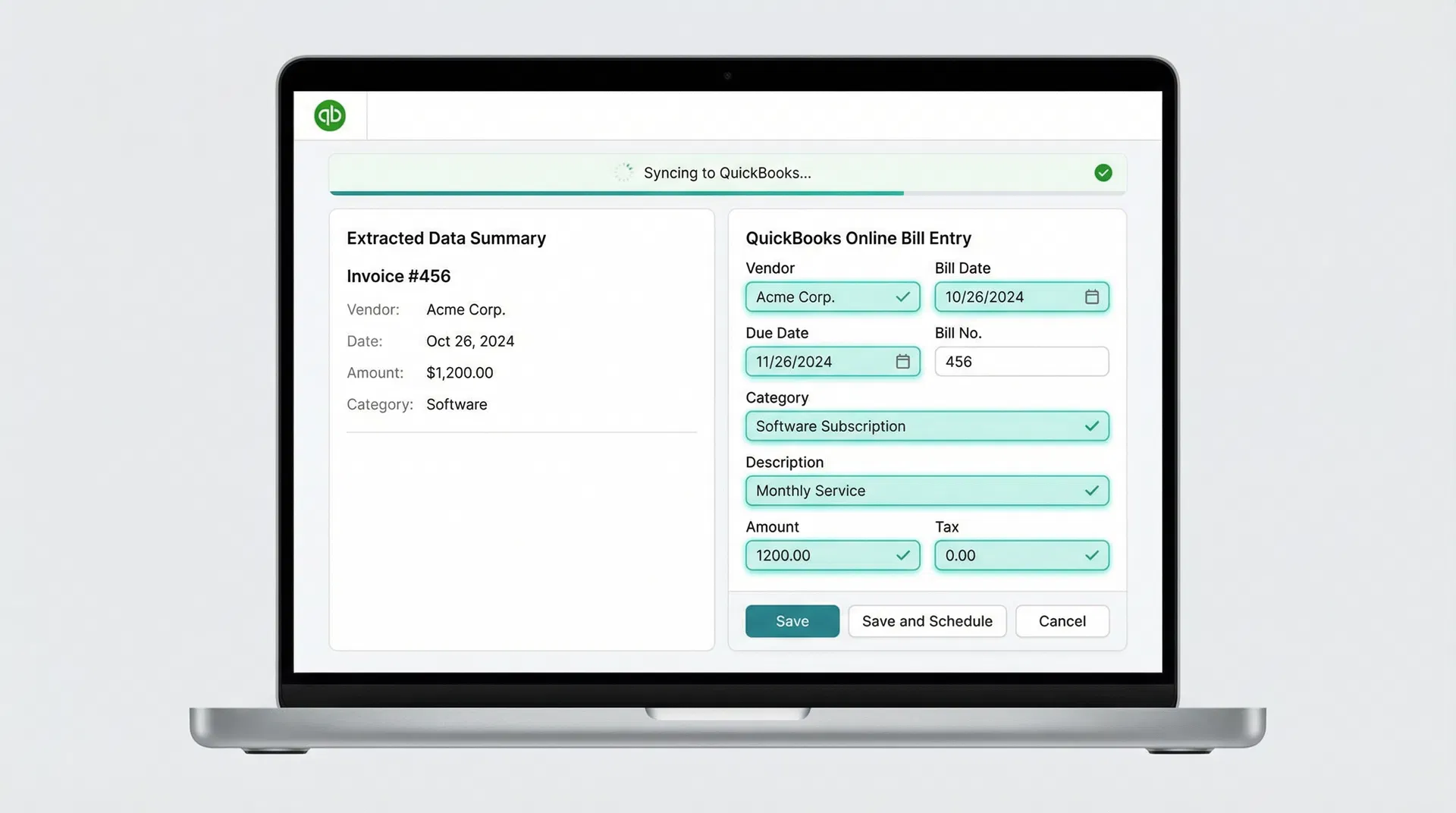
Sync to QuickBooks®
ส่งเข้า QuickBooks®
Bills and entries created in QuickBooks® instantly
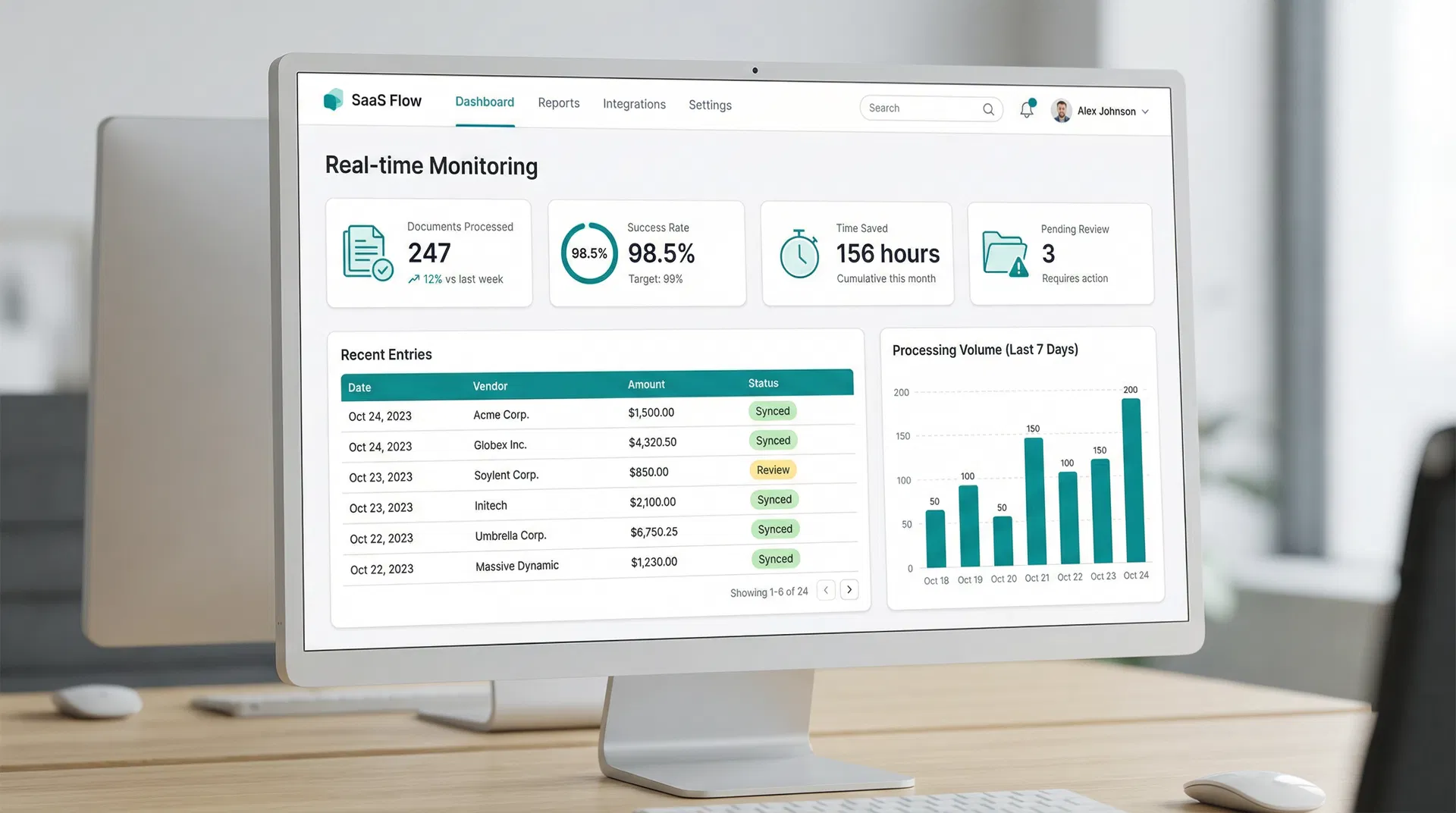
Real-time Dashboard
แดชบอร์ดเรียลไทม์
Track every document — success, errors, pending
4 Simple Steps to Automate Your Accounting
4 ขั้นตอนง่ายๆ สู่ระบบบัญชีอัตโนมัติ
Upload or Receive Invoice
อัปโหลดหรือรับเอกสาร
Upload invoices as PDF, take a photo, or forward them via email. The system accepts any standard invoice format — Thai or English.
อัปโหลด PDF, ถ่ายรูป, หรือส่งผ่านอีเมล รองรับเอกสารทั้งภาษาไทยและอังกฤษ
AI Extracts Key Data
AI ดึงข้อมูลสำคัญ
Our AI reads and extracts vendor name, amount, VAT, withholding tax, date, and line items — with over 95% accuracy on standard documents.
AI อ่านและดึงชื่อผู้ขาย, จำนวนเงิน, VAT, ภาษีหัก ณ ที่จ่าย, วันที่ อัตโนมัติ
Auto-Create Entries in QuickBooks®
สร้างรายการใน QuickBooks® อัตโนมัติ
Extracted data is automatically mapped to your Chart of Accounts and creates Bills, Invoices, or Expenses in QuickBooks® — no manual typing required.
ข้อมูลถูกจับคู่กับผังบัญชีและสร้าง Bill/Invoice ใน QuickBooks® ให้อัตโนมัติ
Dashboard Shows Status
แดชบอร์ดแสดงสถานะ
A real-time dashboard shows every processed document — success, errors, and items flagged for review. Full visibility at a glance.
แดชบอร์ดแสดงสถานะเอกสารทุกรายการ — สำเร็จ, ข้อผิดพลาด, รอตรวจสอบ
Why Automate with AI + QuickBooks®?
ทำไมต้องใช้ AI ร่วมกับ QuickBooks®?
Reduce Manual Data Entry by Up to 80%
ลดงานคีย์ข้อมูลด้วยมือได้ถึง 80%
Free your accounting team from repetitive typing. Let AI handle the data entry while your team focuses on analysis and strategy.
Minimize Human Errors
ลดข้อผิดพลาดจากมนุษย์
AI verifies every entry against the source document. Catch discrepancies before they become costly mistakes in your books.
Save Time for Accounting Teams
ประหยัดเวลาให้ทีมบัญชี
What used to take hours now takes minutes. Process hundreds of invoices in the time it takes to manually enter a few.
Seamless QuickBooks® Integration
เชื่อมต่อ QuickBooks® ได้อย่างราบรื่น
Built on the official QuickBooks® API. Bills, invoices, and expenses appear directly in your QuickBooks® — no import/export needed.
No Need to Change Your Existing Workflow
ไม่ต้องเปลี่ยน workflow เดิม
Keep using QuickBooks® exactly as you do today. Our AI works alongside your current process, not against it.
Measurable Impact on Your Business
ผลลัพธ์ที่วัดได้จริงสำหรับธุรกิจของคุณ
Less Manual Entry
ลดงานคีย์ด้วยมือ
Data Accuracy
ความแม่นยำของข้อมูล
Faster Processing
ประมวลผลเร็วขึ้น
Status Tracking
ติดตามสถานะ
Built for Teams That Rely on QuickBooks®
ออกแบบมาสำหรับทีมที่ใช้ QuickBooks® เป็นหลัก
Companies Using QuickBooks®
บริษัทที่ใช้ QuickBooks®
If your team spends hours entering invoices and bills into QuickBooks®, this solution eliminates that bottleneck entirely.
Accounting Firms Handling Multiple Clients
สำนักงานบัญชีที่ดูแลหลายบริษัท
Manage multiple QuickBooks® accounts efficiently. Process documents from all your clients through a single AI pipeline.
Finance Teams with High-Volume Processing
ทีมการเงินที่มีเอกสารจำนวนมาก
Retail, wholesale, import/export businesses processing hundreds of invoices monthly — automate the entire intake process.
Frequently Asked Questions
คำถามที่พบบ่อย
Ready to Automate Your QuickBooks® Workflow?
Book a 30-minute demo — we'll show you exactly how the AI processes your invoices and syncs with QuickBooks®.
นัดหมาย Demo 30 นาที — เราจะแสดงให้เห็นว่า AI ประมวลผลเอกสารและเชื่อมต่อ QuickBooks® อย่างไร
What you'll get from the demo:
- Live walkthrough with your own invoice samples
- See AI extract data and create QuickBooks® entries in real-time
- Custom setup plan for your business
- Transparent pricing — no hidden fees
Start with your own QuickBooks® data — free consultation, no commitment.
เริ่มต้นด้วยข้อมูล QuickBooks® ของคุณเอง — ปรึกษาฟรี ไม่มีข้อผูกมัด